Its 9:30 Wednesday morning, you’ve been “awake” for a total of 10 minutes, you haven’t brushed your teeth, you haven’t eaten, and you are by no means ready to meet the world. You look over at your wall calendar and what do you see? –
Okay, you have approx. 30 minutes to get ready for the world, get to the library, ask a librarian how to find the article, wait in-line to print the article, print it, and then run to class.
Oh, and you are still in your pajamas.
Because we feel sorry for you and how taxing the life of the American College student can be, the Librarians have just made your life easier…
We are online ALL DAY LONG from 8 AM to 11:30 PM.
Same scenario, this time instead of running to the library, you send out an IM to UofSRefDesk, a librarian promptly responds to your question, directs you to the article, you print it at home, and you still have time to put on a decent pair of pants and make it to class early enough to suck up to your professor.
So what was that Screen name again?
AIM = UofSRefDesk
MSN = UofSRefDesk
Yahoo! = UofSRefDesk
Google Talk = UofSRefDesk
I suggest adding us to your buddy list now, that way when you really need us, you won’t have to waste that precious time looking for our screen name again.
Oh, and if you look to your immediate left you’ll see the IM a Librarian “widget.” This little window is a portal right to a University of Scranton Librarian, it acts exactly the same way as an IM window except it lives in your browser. No need to register, just type your text and send. We will respond right inside the same window. This widget IM Window is also available on the Ask-A-Librarian Page.
So, remember no matter which program you use to chat, add us to your buddy list!
Go ahead, just say hello. We won’t mind – we like the attention.
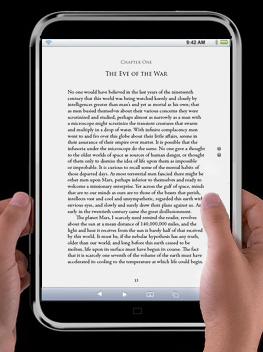
I’m somewhat of a traditionalist when it comes to reading, that is to say, I prefer paper and ink over plastic and electrons. However, I’m always open-minded and willing to try new things; so, a couple years back, I decided to read Aristophanes’s The Clouds entirely on my desktop computer. Sadly, I couldn’t make it all the way through and eventually ended up taking the book out of the library.
However, I did learn something from my experience, namely that it is possible to read large amounts of text entirely online. Personally, I read online all the time, but usually in the form of newspaper/journal articles and other short passages, though occasionally I have pulled-up a couple chapters from a book, in order to get by for the time being.
So if you left your book on the bus, or the library doesn’t have it (highly unlikely), or your shipment hasn’t come in from Amazon yet and you need to have a chapter read by tomorrow, then I suggest giving some of the following resources a try. Keep in mind, you don’t need an iPhone or iTablet to read most eBooks, usually you can open them up right from your desktop/laptop, or even on most SmartPhones and PDAs.
Here are the top 5 FREE eBook sites, in my humble opinion:
1.) The Online Books Page – An Index of eTexts brought to us free of charge by the University of Pennsylvania Libraries.
2.) Project Gutenberg – There are over 25,000 free books in the Project Gutenberg Online Book Catalog. A grand total of over 100,000 titles are available at Project Gutenberg Partners, Affiliates and Resources.
3.) Bookyards.com – Bookyards has a total of 16,045 books, 41,384 external web links, 4,197 news & blogs links, 384 videos, 32,787 Ebook links and access to hundreds of online libraries (800,000 Ebooks) for your reading pleasure.
4.) JustFreeBooks – This website is actually a specialized search engine (similar to Google, except only searches eBook sites). Use the search box to find exactly what you are looking for.
5.) MemoWare.com – Contains over 18,000 “premium” titles. I can’t vouch for exactly what they mean by premium titles, but there are some excellent Literature selections and even some Reference texts.
Currently, there are some really excellent free Windows applications which are great for making your lives, as students, easier. Most of these applications are available for download from www.download.com. Here are a few applications that I find excellent…
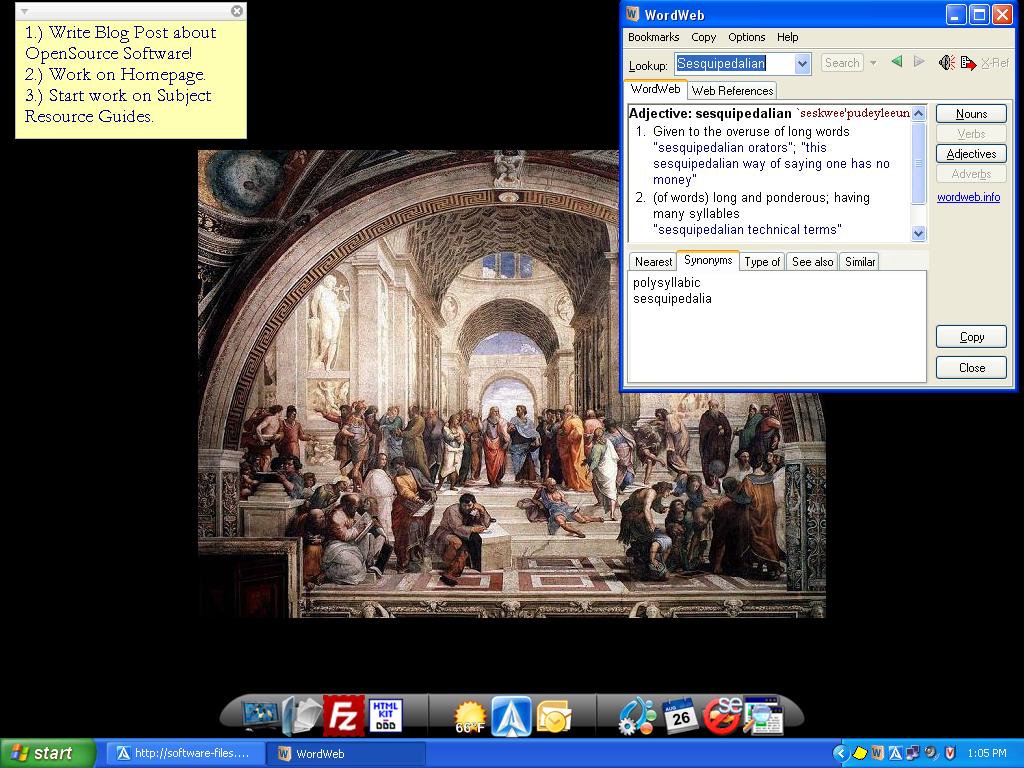
WordWeb is an application that is practically invisible on your desktop, only a small icon is found in your toolbar, and it only pops up when you really need it. However, this application makes looking up definitions quicker and easier than ever before. Once you have downloaded the application, simply highlight the troublesome word in a browser, in a word document, and even PDF files – simultaneously press “CTRL + ALT + W” and a pop-up window gives you the definition you need.
This application is published by Princeton University and pulls its definitions from their WordNet database, so its content is librarian approved.
Do you use Post-It notes to keep track of your assignments? Worse yet do you not keep track of your assignments?
If you answered yes to either of these questions, then you should seriously consider using Stickies. This application takes the Post-It note and makes it digital, so no more sticky pieces of paper all over your walls and on your monitor.
The sticky note could be moved around your desktop or in case of last minute assignments could be set to be “always on top” meaning no browser windows will cover it up, so it’s always reminding you to finish your work. Though the default style is super plain, you can customize the Background color, the Font, and the Font color so that it becomes a little more friendly on the eyes.
As a librarian, I have an affinity for order, this includes desktop icons. Organizing your life is a good way of reducing stress and since many college student’s lives are lived on their computers, your desktop is a good place to start.
Now, with ObjectDock you can organize all of your Desktop Icons into a beautiful “MAC style” Icon Bar anywhere on your screen. Icons are animated and “Pop-up” when you scroll over them. So, now you can have the stylistic features of a MAC Operating System on your Windows PC.
Here’s a screen shot of my desktop and some of my open source items in action:
Click me for a full screen view.
NOTE: There are many free applications out there, try not to download them all just because they are free. Many of the OpenSource applications found on the web are untested and could contain spyware. The items I have listed are tested as Spyware free and have made my life a little bit better.