WML Instant Messenger Now Up and Running!

The WML Instant Messenger!


Let’s run through a hypothetical scenario:

Its 9:30 Wednesday morning, you’ve been “awake” for a total of 10 minutes, you haven’t brushed your teeth, you haven’t eaten, and you are by no means ready to meet the world. You look over at your wall calendar and what do you see? –

Bring a copy of “The Devastated Nest: Crises of Identity in Wuthering Heights and Antigone” from Mosaic : a Journal for the Interdisciplinary Study of Literature to class Wednesday (10 am).

Okay, you have approx. 30 minutes to get ready for the world, get to the library, ask a librarian how to find the article, wait in-line to print the article, print it, and then run to class.

Oh, and you are still in your pajamas.

Because we feel sorry for you and how taxing the life of the American College student can be, the Librarians have just made your life easier…

We are online ALL DAY LONG from 8 AM to 11:30 PM.

Same scenario, this time instead of running to the library, you send out an IM to UofSRefDesk, a librarian promptly responds to your question, directs you to the article, you print it at home, and you still have time to put on a decent pair of pants and make it to class early enough to suck up to your professor.

So what was that Screen name again?

AIM = UofSRefDesk

MSN = UofSRefDesk

Yahoo! = UofSRefDesk

Google Talk = UofSRefDesk

I suggest adding us to your buddy list now, that way when you really need us, you won’t have to waste that precious time looking for our screen name again.

Oh, and if you look to your immediate left you’ll see the IM a Librarian “widget.” This little window is a portal right to a University of Scranton Librarian, it acts exactly the same way as an IM window except it lives in your browser. No need to register, just type your text and send. We will respond right inside the same window. This widget IM Window is also available on the Ask-A-Librarian Page.

So, remember no matter which program you use to chat, add us to your buddy list!

Go ahead, just say hello. We won’t mind – we like the attention.

Congrats, Coach Strong!

Congratulations to Mike Strong, coach of the University of Scranton’s women’s basketball team, on his 700th win!  Coach Strong joined the “700 club” of the NCAA’s winningest coaches this Sunday when the Lady Royals beat Drew, 73-54.

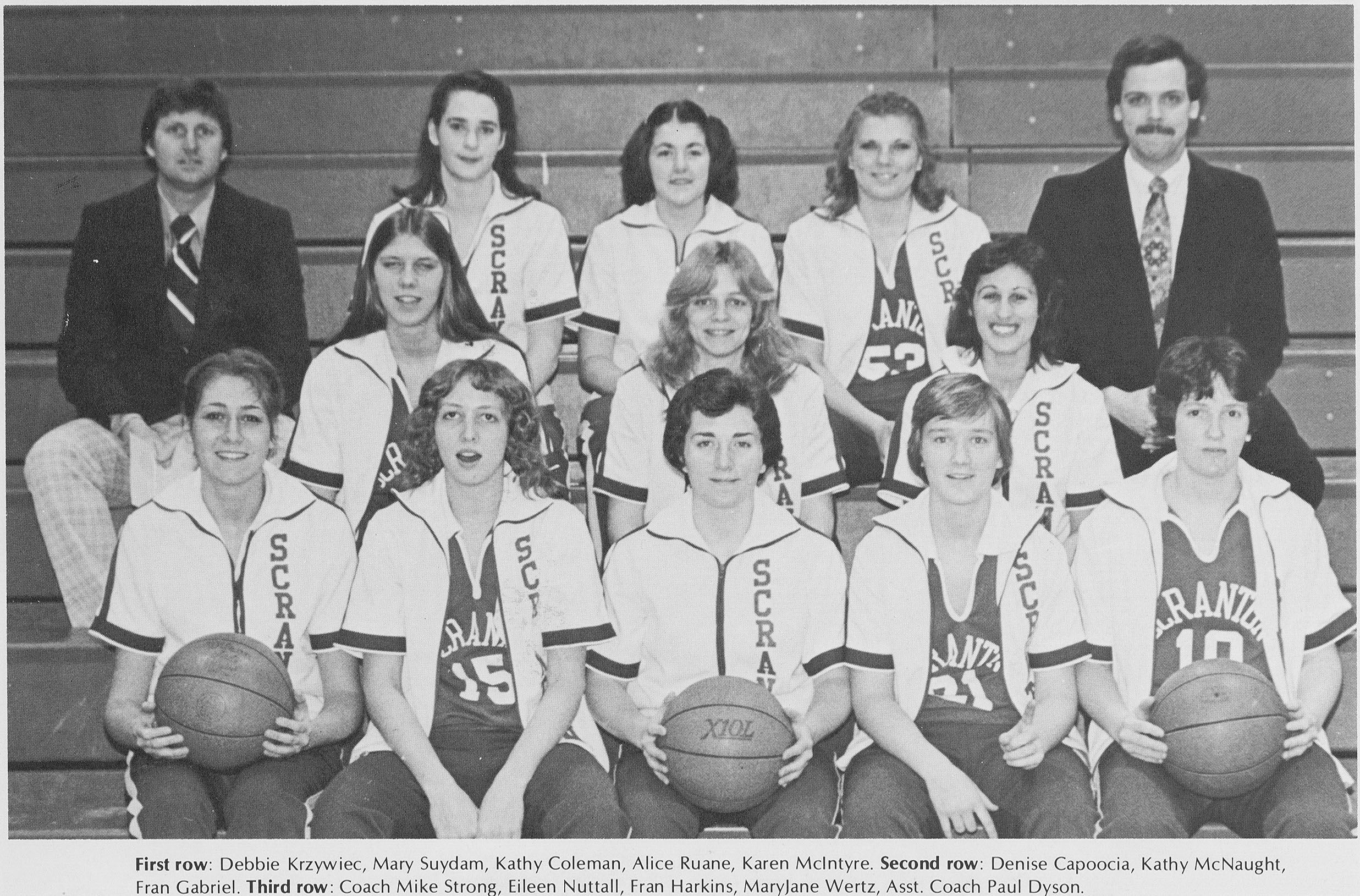
In celebration of this milestone, I searched the University of Scranton Digital Yearbook Collection and found this photo of Coach Strong (on the left in the third row) and the Lady Royals, on p. 62 of the 1980 Windhover yearbook:

Mike Strong with the 1980 Lady Royals

If you want to read more about Coach Strong’s 700th win, check out the University press release, or “The 700 Club,” an article by Scott Walsh that was in Monday’s Scranton Times-Tribune.

U of Scranton yearbooks online, from Aquinas to Windhover

yearbookad-forbboard

January, named after the Roman god of gates and doorways, is not only a great month to celebrate the new year, but also to remember the past. The Weinberg Memorial Library has just made it even easier to reminisce by digitizing all of the University of Scranton’s yearbooks, from the 1916 Aquinas to the 2007 Windhover.

The Weinberg Memorial Library’s Digital Services department is proud to present the University of Scranton Digital Yearbook Collection, a 74 volume set of almost 20,000 digitized pages – all available to the public. You can browse the books to get a feel for each year’s unique student culture, or search the books to find photographs of your favorite University faculty, staff, and alumni!

Questions or comments? Contact the WML Digital Services department!

Chesterton Free Audio via LibriVox

“Love means loving the unlovable – or it is no virtue at all.” –G.K. Chesterton in Heretics

chesteron

After the hectic ending to Fall semester, followed by a nice, long break this year for Christmas and New Year’s, Intersession acts as a month-long “pause” of sorts in the Library’s regular, super-packed routine of the regular semesters. It’s a time when we get started on new projects, spend extra time finding out what’s going on out on the web and in the world, and using our findings to do our jobs better. Plus, with a manageable number of classes in session, we still get to see and interact with students who are looking to get ahead in their studies, which keeps us in touch w/ what you guys need and want out of your Library.

Along these lines, yesterday I came across a neat website and an awesome resource on the web, particularly for fans of G.K. Chesterton*. Chesterton was a prolific writer, a Roman Catholic, a fine storyteller and a very wise man. He is often read alongside C.S. Lewis and J.R.R. Tolkien, although he was not part of the Inklings*, who were sharing ideas and stories just after Chesterton’s time. I own a few of his books (the Library’s collection of works by Chesterton far exceeds mine!), however I have yet to really delve into his writings as I hope to.

So you can imagine my excitement to stumble upon an entire online audio library of many of Chesterton’s works. This collection is part of LibriVox, whose goal it is to record audio versions of all of the books in the public domain. The site as a whole is an awesome resource unto itself — especially if you are an aural learner, and has as its pithy tagline: “acoustical liberation of books in the public domain” (header of the LibriVox website).

If you’re a fan of Chesterton, or enjoy Lewis and Tolkien and are interested in another writer of stories and ideas who is a kindred spirit to those two great thinkers, take a look at/listen to the extensive audio collection of Chesterton’s works. If Chesterton doesn’t do it for you, have at the LibriVox Search Catalog to see if your favorite public domain writer’s works have been recorded and added yet. (Shakespeare, anyone?) And if you don’t see your favorite author from before 1922 (though there are exceptions to the public domain rule of “Published before such and such a date,” which are expounded upon here), volunteer to record his or her works yourself!

*These 2 links to information about Chesterton and the Inklings, I fully admit, are websites for organizations who are devoted to the work of both Chesterton and the Inklings, respectively. As such, their descriptions of their subjects are necessarily colored by their enthusiasm — however, I have found they are also quite factual, out of great respect for the people they are writing about.

The Streets of Scranton, now on Google

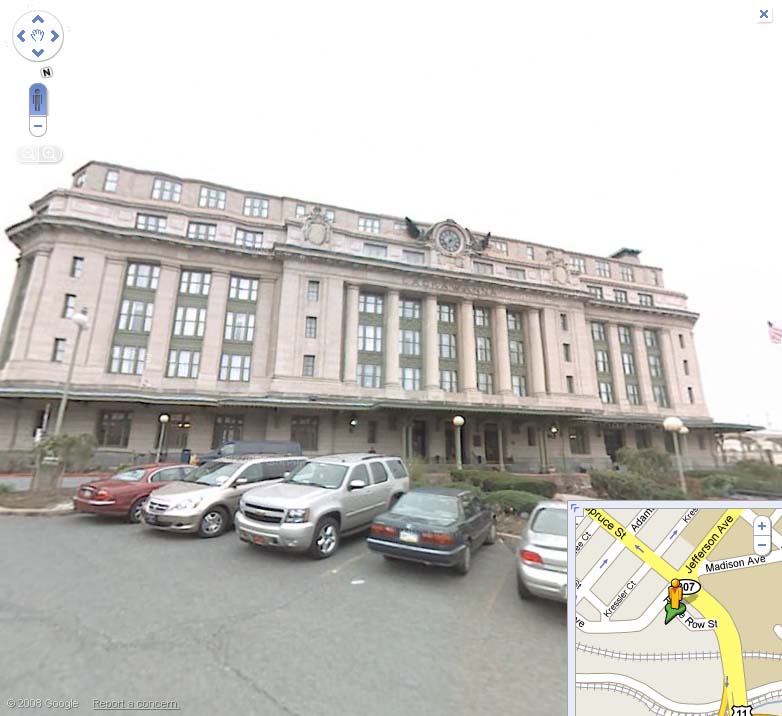
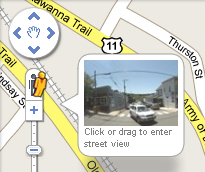
It’s even easier to find your way around Scranton, now that street-level photographic images of the city are available on Google Maps’ Street View feature.  Using Street View, visitors to our area or even newly minted Scrantonians can get a feel for what it’s like to drive or walk down our streets.

The Radisson, as seen on Google Street View

In an article titled “NEPA Goes Global on Google” in Saturday’s Scranton Times-Tribune, staff writer Laura Legere described the benefits of Street View:  “Google touts the program’s practical uses: it can help travelers preview landmarks on the way to a destination, shoppers discover if there are parking meters in front of a store, and homebuyers can peek at the neighborhood around a promising house.”

googlestreetview41

To use Google Street View, just go to Google Maps at www.maps.google.com.  Search for an address you’re interested in, and then click on the orange stick figure right above the zoom bar on the left hand side of the map.  You can drag the stick figure to “fly” over the streets, or just click on it to get into a full Street View image.  Once you’re in Street View, use your mouse or arrow keys to navigate through the entire 360-degree view.  As usual, if you need help using Street View, just ask one of the friendly librarians at the Weinberg Memorial Library for help!

You might notice that not all addresses or streets that you view in Google Maps have Street View images available – that’s because Google hasn’t yet photographed *all* of the streets in the Scranton area.  While West Scranton is well represented, and major roads throughout the area are visible, downtown Scranton, the Hill section, and the University campus aren’t in Street View at this time.  Google is constantly updating their maps, though, so keep your eyes open for Google cars on campus – you can spot them by the large cameras mounted on their roofs.

Google car, captured by Woodvines on Flickr

Enjoy the Lincoln 200th Birthday Celebration!

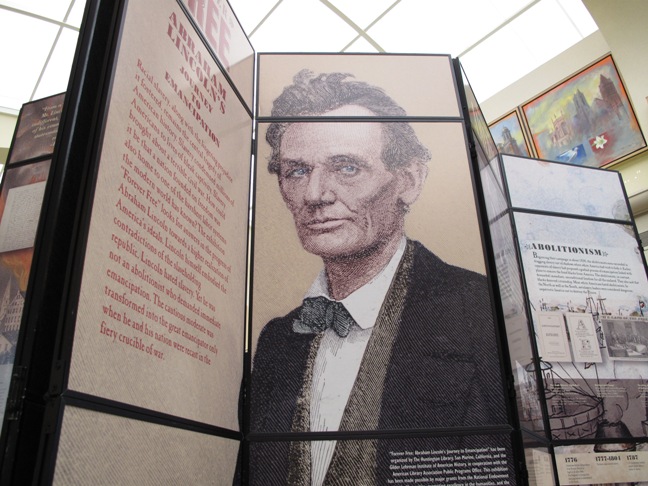
“Forever Free: Abraham Lincoln’s Journey to Emancipation,” a national traveling exhibition that focuses on Lincoln’s quest to restore a Union divided by Civil War, opens at the Weinberg Memorial Library on February 9 through March 22. Organized by the Huntington Library, San Marino, Calif., and the Gilder Lehrman Institute of American History, New York City, in cooperation with American Library Association, this free exhibition shows how Lincoln’s beliefs about freeing the slaves were transformed by war-time developments. “Forever Free” is made possible by major grants from the National Endowment for the Humanities (NEH) and the Abraham Lincoln Bicentennial Commission, created by Congress and charged with planning the national celebration of Lincoln’s 200th birthday.
Weinberg Memorial Library is offering a free one-day conference Saturday, February 14, 2009, 8:30 a.m. until 2 p.m. The conference will feature four speakers discussing topics such as Emerson and Lincoln, the Abolitionist Movement in Pennsylvania, the Underground Railroad in Northeastern Pennsylvania and will include an appearance by Abraham Lincoln, as portrayed by Jim Getty. The conference will conclude with a 1 p.m. reception in the Weinberg Library Heritage Room to view the exhibit. The complete exhibit schedule can be found at http://academic.scranton.edu/department/wml/lincoln-event.html. Please contact Michael Knies, 570-941-6341 or Michael.Knies@Scranton.edu for more information and to register for the free conference.

Pandora Radio, Music Genomes, & Beautiful Sounds

Here we are, in the thick of finals. All-nighters. Citation madness. Dum-dum lollipops from the Reference Desk.

I know all about it — I’m the trusty librarian that is up at least half the night with you this week, at the Reference Desk ’til 2 am when we close.

But boy, did I come across a gem of a website that I believe you will love as much as I do. Because we all love music, right? But of course we love very different kinds of music… And that’s where the brilliance of Pandora Radio comes in.

This website allows you to create personalized, customized Internet radio stations that play only the music you love. When I first heard about it, I was very skeptical as to how user-friendly, effective or accurate such a claim could be. But I moseyed on over to the URL, where I was prompted to input a favorite artist or song. I humored Pandora, and typed in “Jason Mraz.” A station called “Jason Mraz Radio” started playing, with the first song as “I’d Do Anything” off of his first studio album, Waiting for my Rocket to Come. Okay, that’s neat, and I figured it would just play Jason songs in succession… But then, the second song began, and it wasn’t Jason, but a groovy rendition of “Over the Rainbow” by a Hawaiian artist whose name I can’t remember, accompanying himself on a ukulele — a version of the song I had heard about but never gotten around to looking up. A little pop-up from Pandora told me they were playing this song because, essentially, it “sounds” like Jason’s music. Well, it wasn’t Jason, but it was groovy in all the ways Jason is, and I was pleased. And the neat part is, now I have learned about an artist I never would have known about, for free, who plays the same kind of music as Jason — the kind of music I like. This is very cool indeed.

So I started creating other stations, and decided it was well worth creating an account at the site, so I could save my stations for future use. Right now, I am listening to “Bluegrassy Instrumental” (one of the genre-stations they also offer), and I’m loving it. And when Pandora plays a song I like in particular, I have a few options: I can rate it w/ a thumbs up, so the station knows to play more songs like it, and I can also Bookmark the song, so I can remember the artist and album for future reference. There are also ways to interact with other Pandora Radio listeners, recommending songs, creating profiles, etc. This site rocks my socks, and it will rock yours too. Just trust me on that one.

But you may ask, how does Pandora achieve this? How can a website or even an extensive database of music know what songs are really like other songs? That’s where the Music Genome Project comes in. I won’t go crazy trying to explain how the participants do what they do, but in short, they basically map the musical DNA of every song, characterizing and analyzing each song for many things like “melody, harmony, instrumentation, rhythm, vocals, lyrics” (taken from About Pandora — worth reading too). Then Pandora takes these DNA maps (as I’m calling them) and uses them to match songs with other songs, to create a stream of music that can continually be customized to fit your taste in that style of music.

I think this is just awesome, and I felt the need to share it with all of you. We all love music, and this tool not only gives open access to the thing we love, but it enables us to discover artists and songs we might never have before.

So, if you need music in the background while you work on papers and finals — for my part, certain kinds of music (like “Bluegrassy Instrumental”) help me concentrate — check out Pandora Radio.

This is technology and the Internet at their best.